xg-FK注崩解决方法-e54545
FK注崩解決方法
錯誤提示1:
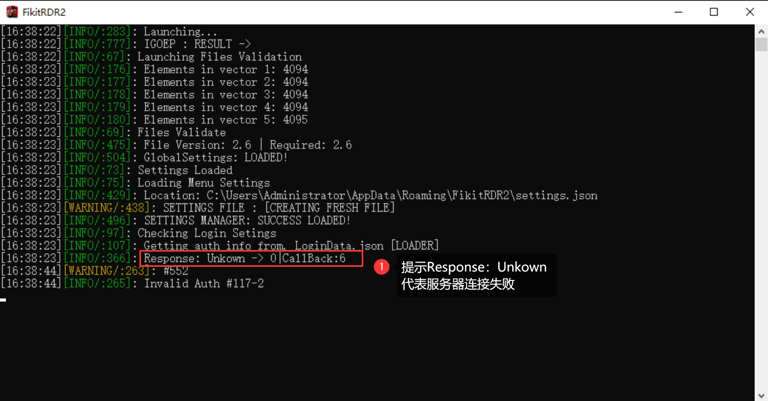
Response:Unkown - > x丨CallBack:x
日誌中如果出現下圖提示::即代表伺服器連接失敗
解決方法:
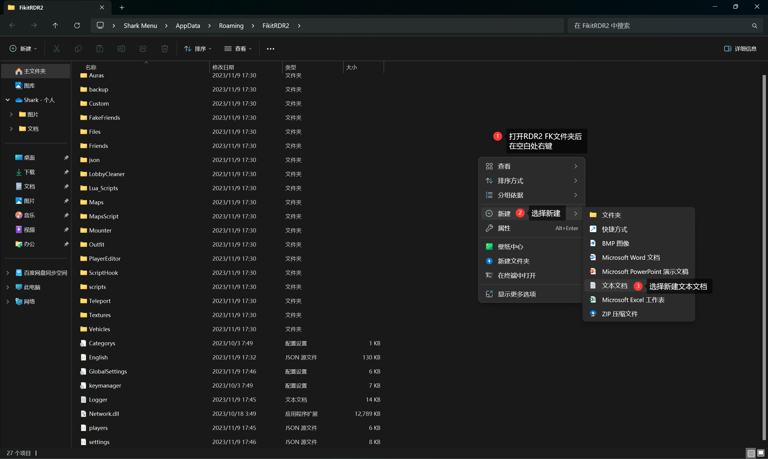
通過系統方式進入FiKitRDR2文件夾
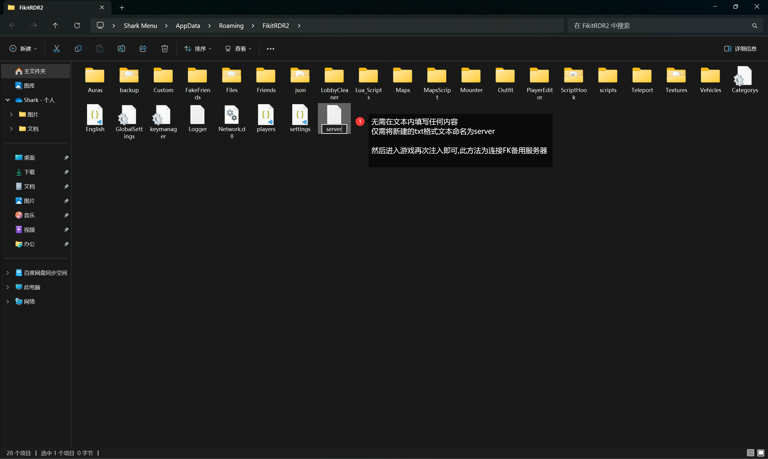
在文件夾內空白處右鍵,新建一個TXT格式的文本文檔,無需在文檔內填寫任何內容
僅需將新建的文本命名為server
保存命名後進入遊戲再次注入即可使FK連接至備用伺服器
錯誤提示2:
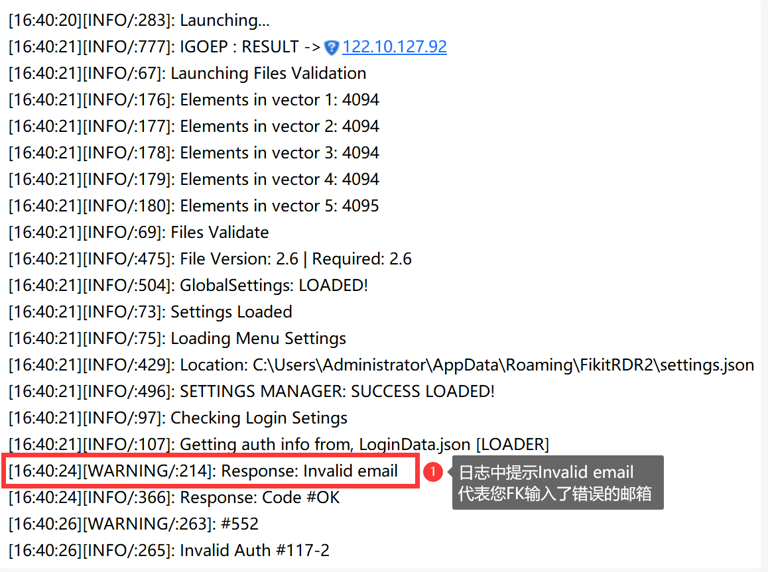
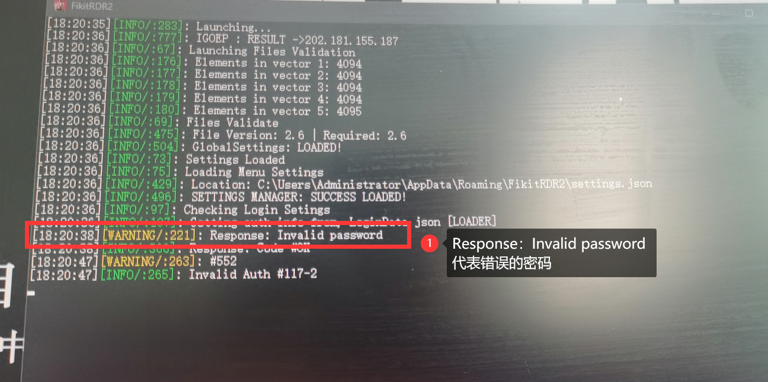
Response:Invalid email [錯誤的郵箱] Response:Invalid password [錯誤的密碼]
日誌中如果出現下圖提示:即代表FK郵箱或密碼錯誤
[因安裝器是非官方製作,所以儘管您輸入123也可以安裝成功]
這將導致部分用戶可能會將郵箱和密碼輸入錯誤而導致的遊戲崩潰
解決方法:
安裝器用戶可通過安裝器 卸載錯誤帳號密碼的RDR2 FK文件
然後重新輸入並安裝正確的郵箱密碼再注入嘗試 [此問題幾乎只存在於安裝器用戶]
您可以如下圖操作
錯誤提示3:
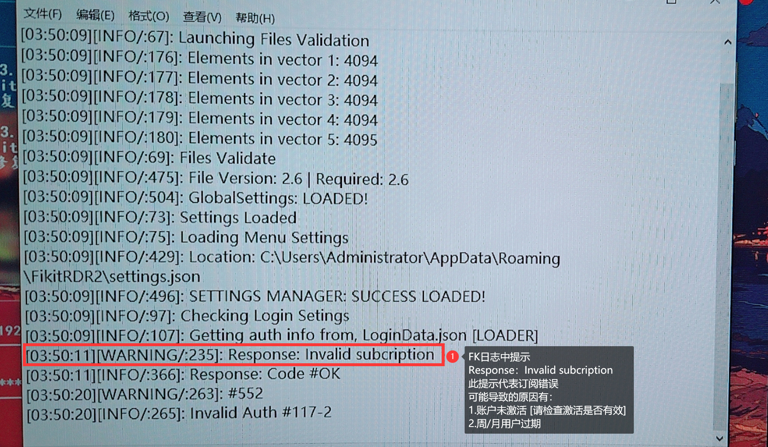
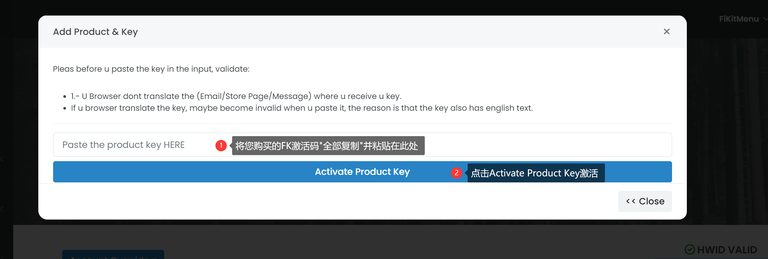
Response:Invalid subcription [錯誤訂閱] 顧名思義 "訂閱=激活"
日誌中如果出現下圖提示:即代表帳戶沒有激活
1.帳戶為周/月用戶 過期會導致此提示
2.未在官網中使用激活碼激活FK帳戶會導致此提示
解決方法:
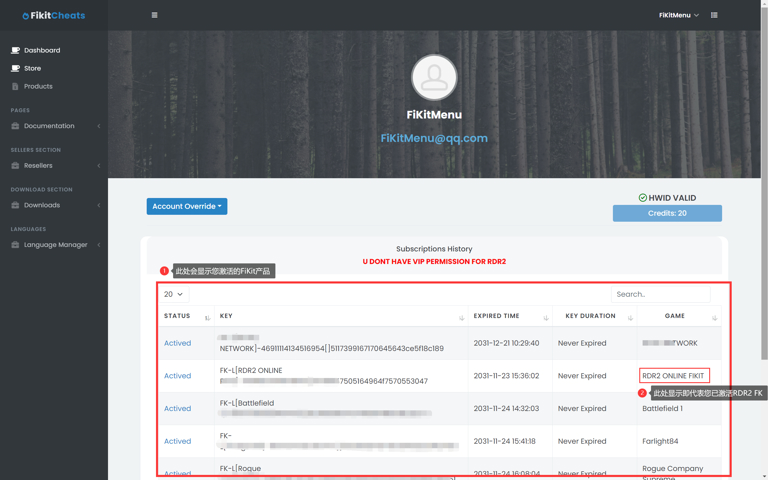
登陸FK官網並檢查訂閱是否有效
根據下圖提示操作FK帳戶下方可看到您已激活的產品
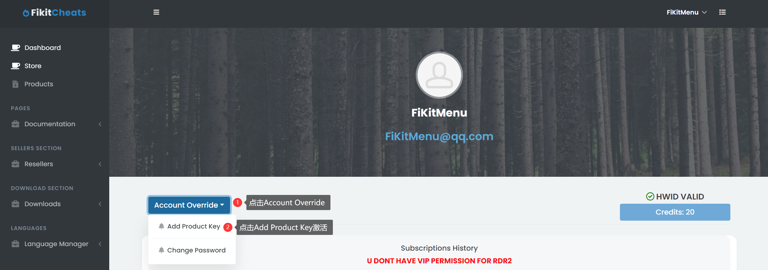
若您未發現任何激活內容,請按下圖操作激活您的FK帳戶
錯誤提示4:
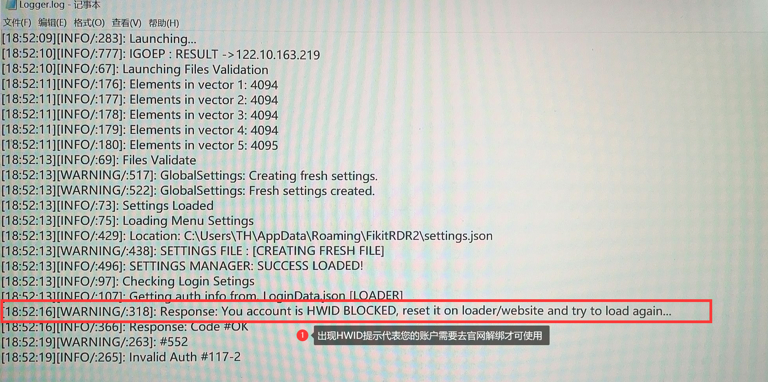
Response:Your acount is HWID BLOCKED [需要重置HWID解除電腦綁定]
日誌中如果出現下圖提示:即代表您可能更換環境活機器使用了FK
解決方法:
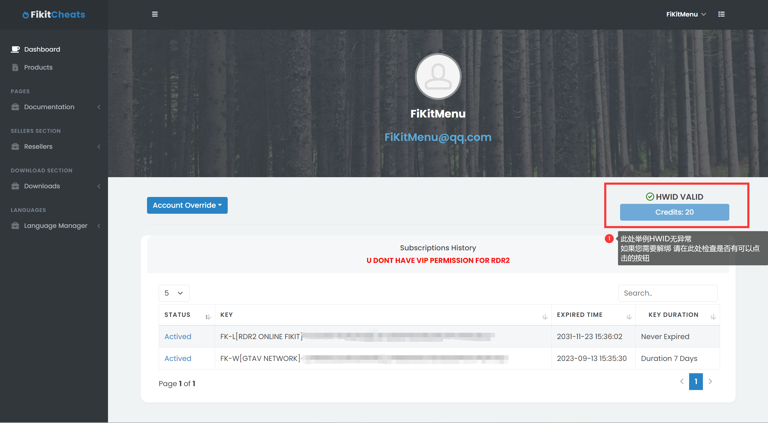
登陸FK官網並解除HWID限制
根據下圖提示操作
錯誤提示5:
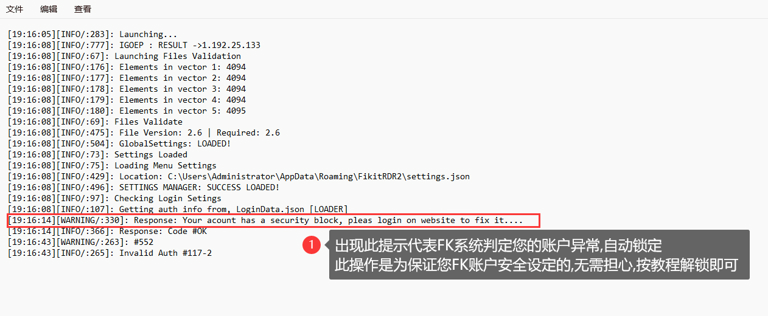
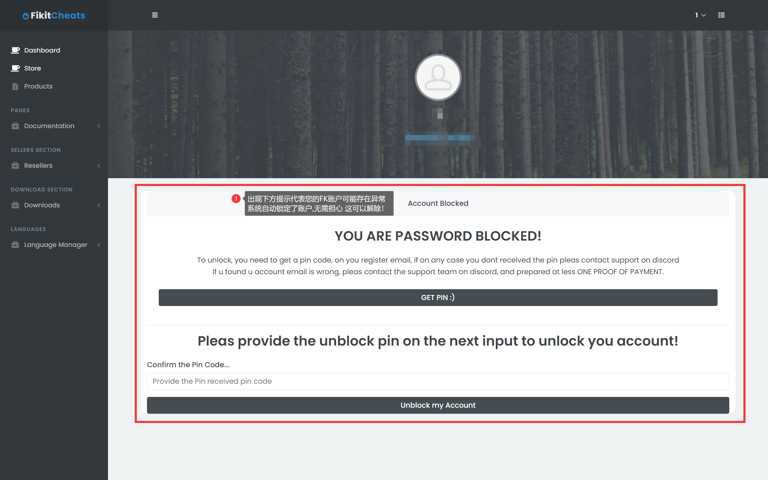
Response:Your acount has a security block,please login on website to fix it.... [帳戶鎖定]
日誌中如果出現下圖提示:即代表FK系統判定您的帳戶可能有風險,暫時鎖定帳戶
解決方法:
登陸FK官網進行解鎖
根據下圖提示操作
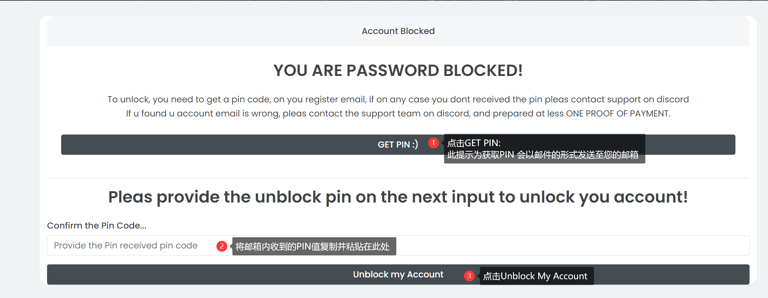

若您的帳戶無法正常收到PIN
請檢查垃圾郵箱,若依然無法得到PIN
請聯繫所售商家向官方反饋獲取您的PIN值
錯誤提示6:
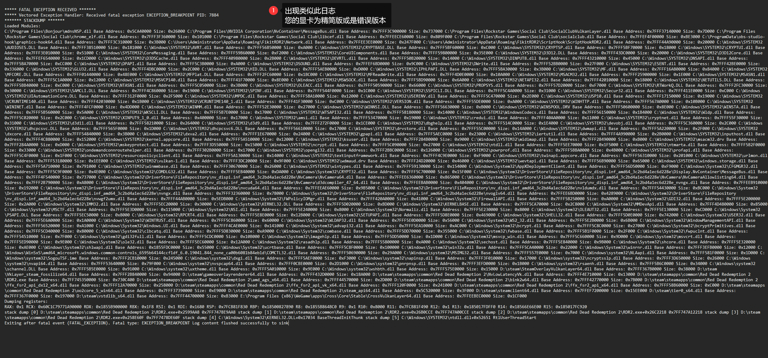
日誌若如下圖
英偉達用戶注崩
這是針對仍然崩潰並且擁有 NVIDIA GPU 的用戶的教程
檢查RDR2 FiKit 日誌,若與下方內容相似,可按此教程解決
***** FATAL EXCEPTION RECEIVED *******
***** Vectored Exception Handler: Received fatal exception EXCEPTION_BREAKPOINT PID: 7884
******* STACKDUMP *******
Loaded Modules:
C:\Program Files\Bonjour\mdnsNSP.dll Base Address: 0x5CA40000 Size: 0x26000 C:\Program Files\NVIDIA Corporation\NvContainer\MessageBus.dll Base Address: 0x7FFF3C900000 Size: 0x737000 C:\Program Files\Rockstar Games\Social Club\SocialClubVulkanLayer.dll Base Address: 0x7FFF37140000 Size: 0x7D000 C:\Program Files\Rockstar Games\Social Club\chrome_elf.dll Base Address: 0x7FFF3F360000 Size: 0x101000 C:\Program Files\Rockstar Games\Social Club\libcef.dll Base Address: 0x7FFEECE60000 Size: 0x809F000 C:\Program Files\Rockstar Games\Social Club\socialclub.dll Base Address: 0x7FFEF4F00000 Size: 0xBE3000 C:\ProgramData\obs-studio-hook\graphics-hook64.dll Base Address: 0x7FFF3C310000 Size: 0x3B000 C:\Users\Administrator\AppData\Roaming\FikitRDR2\Network.dll Base Address: 0x7FFEE3EE0000 Size: 0x247F000 C:\Users\Administrator\AppData\Roaming\FikitRDR2\ScriptHook\ScriptHookRDR2.dll Base Address: 0x7FFF44A90000 Size: 0x20000 C:\Windows\SYSTEM32\AUDIOSES.DLL Base Address: 0x7FFF38510000 Size: 0x181000 C:\Windows\SYSTEM32\AVRT.dll Base Address: 0x7FFF56B50000 Size: 0xA000 C:\Windows\SYSTEM32\CRYPTBASE.DLL Base Address: 0x7FFF5BF60000 Size: 0xC000 C:\Windows\SYSTEM32\CRYPTSP.dll Base Address: 0x7FFF5BF70000 Size: 0x18000 C:\Windows\SYSTEM32\CRYPTUI.dll Base Address: 0x7FFF3E010000 Size: 0x51000 C:\Windows\SYSTEM32\CoreMessaging.dll Base Address: 0x7FFF59B60000 Size: 0xF2000 C:\Windows\SYSTEM32\CoreUIComponents.dll Base Address: 0x7FFF59800000 Size: 0x35E000 C:\Windows\SYSTEM32\D3D12.DLL Base Address: 0x7FFF43DC0000 Size: 0x20000 C:\Windows\SYSTEM32\D3D12Core.dll Base Address: 0x7FFEF6540000 Size: 0x1CD000 C:\Windows\SYSTEM32\D3DSCache.dll Base Address: 0x7FFF40980000 Size: 0x2B000 C:\Windows\SYSTEM32\DEVRTL.dll Base Address: 0x7FFF50B20000 Size: 0x14000 C:\Windows\SYSTEM32\DINPUT8.dll Base Address: 0x7FFF43210000 Size: 0x45000 C:\Windows\SYSTEM32\DNSAPI.dll Base Address: 0x7FFF5BA70000 Size: 0xCC000 C:\Windows\SYSTEM32\DPAPI.dll Base Address: 0x7FFF5C3B0000 Size: 0xA000 C:\Windows\SYSTEM32\DSOUND.dll Base Address: 0x7FFEF6BD0000 Size: 0x9C000 C:\Windows\SYSTEM32\DWrite.dll Base Address: 0x7FFF52BB0000 Size: 0x27F000 C:\Windows\SYSTEM32\ESENT.dll Base Address: 0x7FFF42BE0000 Size: 0x336000 C:\Windows\SYSTEM32\GLU32.dll Base Address: 0x7FFF4DBC0000 Size: 0x2C000 C:\Windows\SYSTEM32\HID.DLL Base Address: 0x7FFF5AEB0000 Size: 0xD000 C:\Windows\SYSTEM32\IPHLPAPI.DLL Base Address: 0x7FFF5BA30000 Size: 0x3B000 C:\Windows\SYSTEM32\MF.dll Base Address: 0x7FFF16A80000 Size: 0x84000 C:\Windows\SYSTEM32\MFCORE.DLL Base Address: 0x7FFF01440000 Size: 0x48E000 C:\Windows\SYSTEM32\MFPlat.DLL Base Address: 0x7FFF2FC60000 Size: 0x1BC000 C:\Windows\SYSTEM32\MFReadWrite.dll Base Address: 0x7FFF4D0E0000 Size: 0x10A000 C:\Windows\SYSTEM32\MSACM32.dll Base Address: 0x7FFF25900000 Size: 0x1E000 C:\Windows\SYSTEM32\MSASN1.dll Base Address: 0x7FFF5C1A0000 Size: 0x12000 C:\Windows\SYSTEM32\MSVCP140.dll Base Address: 0x7FFF41F70000 Size: 0x8E000 C:\Windows\SYSTEM32\MSWSOCK.dll Base Address: 0x7FFF5BD90000 Size: 0x6A000 C:\Windows\SYSTEM32\NETAPI32.dll Base Address: 0x7FFF42010000 Size: 0x18000 C:\Windows\SYSTEM32\NETUTILS.DLL Base Address: 0x7FFF5BB40000 Size: 0xC000 C:\Windows\SYSTEM32\NTASN1.dll Base Address: 0x7FFF5C050000 Size: 0x3B000 C:\Windows\SYSTEM32\OLEACC.dll Base Address: 0x7FFF50590000 Size: 0x66000 C:\Windows\SYSTEM32\PROPSYS.dll Base Address: 0x7FFF57D20000 Size: 0xF7000 C:\Windows\SYSTEM32\RTWorkQ.DLL Base Address: 0x7FFF2FC30000 Size: 0x30000 C:\Windows\SYSTEM32\SAMCLI.DLL Base Address: 0x7FFF4C860000 Size: 0x19000 C:\Windows\SYSTEM32\SPINF.dll Base Address: 0x7FFF544F0000 Size: 0x1C000 C:\Windows\SYSTEM32\SSPICLI.DLL Base Address: 0x7FFF5C4A0000 Size: 0x31000 C:\Windows\SYSTEM32\Secur32.dll Base Address: 0x7FFF411E0000 Size: 0xC000 C:\Windows\SYSTEM32\UIAutomationCore.DLL Base Address: 0x7FFF312F0000 Size: 0x2F5000 C:\Windows\SYSTEM32\UMPDC.dll Base Address: 0x7FFF5BA10000 Size: 0x12000 C:\Windows\SYSTEM32\USERENV.dll Base Address: 0x7FFF5C470000 Size: 0x2E000 C:\Windows\SYSTEM32\USP10.dll Base Address: 0x7FFF17150000 Size: 0x19000 C:\Windows\SYSTEM32\VCRUNTIME140.dll Base Address: 0x7FFF42030000 Size: 0x1B000 C:\Windows\SYSTEM32\VCRUNTIME140_1.dll Base Address: 0x7FFF41F30000 Size: 0xC000 C:\Windows\SYSTEM32\VERSION.dll Base Address: 0x7FFF55DE0000 Size: 0xA000 C:\Windows\SYSTEM32\WINHTTP.dll Base Address: 0x7FFF567A0000 Size: 0x10B000 C:\Windows\SYSTEM32\WININET.dll Base Address: 0x7FFF4FCF0000 Size: 0x4DD000 C:\Windows\SYSTEM32\WINMM.dll Base Address: 0x7FFF52E30000 Size: 0x27000 C:\Windows\SYSTEM32\WINNSI.DLL Base Address: 0x7FFF56630000 Size: 0xB000 C:\Windows\SYSTEM32\WINSPOOL.DRV Base Address: 0x7FFF50600000 Size: 0x8E000 C:\Windows\SYSTEM32\WINSTA.dll Base Address: 0x7FFF5B560000 Size: 0x5A000 C:\Windows\SYSTEM32\WKSCLI.DLL Base Address: 0x7FFF5B7E0000 Size: 0x17000 C:\Windows\SYSTEM32\WTSAPI32.dll Base Address: 0x7FFF58180000 Size: 0x14000 C:\Windows\SYSTEM32\WindowsCodecs.dll Base Address: 0x7FFF56150000 Size: 0x1B4000 C:\Windows\SYSTEM32\Wldp.dll Base Address: 0x7FFF5C020000 Size: 0x2C000 C:\Windows\SYSTEM32\XINPUT9_1_0.dll Base Address: 0x400000 Size: 0x17000 C:\Windows\SYSTEM32\amsi.dll Base Address: 0x7FFF53470000 Size: 0x19000 C:\Windows\SYSTEM32\credui.dll Base Address: 0x7FFF40AA0000 Size: 0x11000 C:\Windows\SYSTEM32\cryptnet.dll Base Address: 0x7FFF55F30000 Size: 0x31000 C:\Windows\SYSTEM32\d3d11.dll Base Address: 0x7FFF58210000 Size: 0x264000 C:\Windows\SYSTEM32\d3d9.dll Base Address: 0x7FFF272F0000 Size: 0x1CE000 C:\Windows\SYSTEM32\dbghelp.dll Base Address: 0x7FFF514C0000 Size: 0x1E4000 C:\Windows\SYSTEM32\devobj.dll Base Address: 0x7FFF5C360000 Size: 0x2C000 C:\Windows\SYSTEM32\dhcpcsvc.DLL Base Address: 0x7FFF565F0000 Size: 0x1D000 C:\Windows\SYSTEM32\dhcpcsvc6.DLL Base Address: 0x7FFF56610000 Size: 0x17000 C:\Windows\SYSTEM32\drvstore.dll Base Address: 0x7FFF55C00000 Size: 0x14A000 C:\Windows\SYSTEM32\dwmapi.dll Base Address: 0x7FFF5A220000 Size: 0x2F000 C:\Windows\SYSTEM32\dxcore.dll Base Address: 0x7FFF54840000 Size: 0x3B000 C:\Windows\SYSTEM32\dxva2.dll Base Address: 0x7FFF1E670000 Size: 0x24000 C:\Windows\SYSTEM32\gpapi.dll Base Address: 0x7FFF5AEC0000 Size: 0x23000 C:\Windows\SYSTEM32\iertutil.dll Base Address: 0x7FFF4A990000 Size: 0x2B0000 C:\Windows\SYSTEM32\inputhost.dll Base Address: 0x7FFF4C880000 Size: 0x152000 C:\Windows\SYSTEM32\kernel.appcore.dll Base Address: 0x7FFF5A510000 Size: 0x12000 C:\Windows\SYSTEM32\ksuser.dll Base Address: 0x7FFF284B0000 Size: 0x9000 C:\Windows\SYSTEM32\midimap.dll Base Address: 0x7FFF28490000 Size: 0xB000 C:\Windows\SYSTEM32\msacm32.drv Base Address: 0x7FFF284A0000 Size: 0xD000 C:\Windows\SYSTEM32\mskeyprotect.dll Base Address: 0x7FFF3D550000 Size: 0x15000 C:\Windows\SYSTEM32\ncrypt.dll Base Address: 0x7FFF5C090000 Size: 0x27000 C:\Windows\SYSTEM32\ntdll.dll Base Address: 0x7FFF5EE70000 Size: 0x1F5000 C:\Windows\SYSTEM32\ntmarta.dll Base Address: 0x7FFF5B2F0000 Size: 0x33000 C:\Windows\SYSTEM32\ondemandconnroutehelper.dll Base Address: 0x7FFF302B0000 Size: 0x17000 C:\Windows\SYSTEM32\opengl32.dll Base Address: 0x7FFF2BBC0000 Size: 0x126000 C:\Windows\SYSTEM32\powrprof.dll Base Address: 0x7FFF5BBA0000 Size: 0x4B000 C:\Windows\SYSTEM32\profapi.dll Base Address: 0x7FFF5C4F0000 Size: 0x1F000 C:\Windows\SYSTEM32\resourcepolicyclient.dll Base Address: 0x7FFF5A130000 Size: 0x14000 C:\Windows\SYSTEM32\textinputframework.dll Base Address: 0x7FFF4C9E0000 Size: 0xF9000 C:\Windows\SYSTEM32\twinapi.appcore.dll Base Address: 0x7FFF56310000 Size: 0x201000 C:\Windows\SYSTEM32\urlmon.dll Base Address: 0x7FFF53180000 Size: 0x1EE000 C:\Windows\SYSTEM32\vulkan-1.dll Base Address: 0x7FFF3DC20000 Size: 0x9F000 C:\Windows\SYSTEM32\wdmaud.drv Base Address: 0x7FFF24D20000 Size: 0x46000 C:\Windows\SYSTEM32\wevtapi.dll Base Address: 0x7FFF56B90000 Size: 0x65000 C:\Windows\SYSTEM32\windows.storage.dll Base Address: 0x7FFF5A710000 Size: 0x791000 C:\Windows\SYSTEM32\winmmbase.dll Base Address: 0x7FFF30670000 Size: 0x26000 C:\Windows\SYSTEM32\wintypes.dll Base Address: 0x7FFF59130000 Size: 0x154000 C:\Windows\System32\AppXDeploymentClient.dll Base Address: 0x7FFF56D50000 Size: 0xF9000 C:\Windows\System32\CFGMGR32.dll Base Address: 0x7FFF5C9F0000 Size: 0x4E000 C:\Windows\System32\COMDLG32.dll Base Address: 0x7FFF5EB40000 Size: 0xDA000 C:\Windows\System32\CRYPT32.dll Base Address: 0x7FFF5C700000 Size: 0x15F000 C:\Windows\System32\DriverStore\FileRepository\nv_dispi.inf_amd64_3c2bd4a1ec6d228e\Display.NvContainer\MessageBus.dll Base Address: 0x7FFF4F540000 Size: 0x737000 C:\Windows\System32\DriverStore\FileRepository\nv_dispi.inf_amd64_3c2bd4a1ec6d228e\NvCamera\NvCamera64.dll Base Address: 0x7FFEE6360000 Size: 0x865000 C:\Windows\System32\DriverStore\FileRepository\nv_dispi.inf_amd64_3c2bd4a1ec6d228e\NvCamera\NvCameraAllowlisting64.dll Base Address: 0x7FFF2B790000 Size: 0xA8000 C:\Windows\System32\DriverStore\FileRepository\nv_dispi.inf_amd64_3c2bd4a1ec6d228e\NvCamera\d3dcompiler_47_64.dll Base Address: 0x7FFEEBAB0000 Size: 0x404000 C:\Windows\System32\DriverStore\FileRepository\nv_dispi.inf_amd64_3c2bd4a1ec6d228e_nvngx.dll Base Address: 0x7FFEEB910000 Size: 0x192000 C:\Windows\System32\DriverStore\FileRepository\nv_dispi.inf_amd64_3c2bd4a1ec6d228e\nvcuda64.dll Base Address: 0x7FFEEAE60000 Size: 0x9B5000 C:\Windows\System32\DriverStore\FileRepository\nv_dispi.inf_amd64_3c2bd4a1ec6d228e\nvldumdx.dll Base Address: 0x7FFF54430000 Size: 0xBC000 C:\Windows\System32\DriverStore\FileRepository\nv_dispi.inf_amd64_3c2bd4a1ec6d228e\nvngx.dll Base Address: 0x7FFF32360000 Size: 0x78000 C:\Windows\System32\DriverStore\FileRepository\nv_dispi.inf_amd64_3c2bd4a1ec6d228e\nvoglv64.dll Base Address: 0x7FFEE6BD0000 Size: 0x4289000 C:\Windows\System32\DriverStore\FileRepository\nv_dispi.inf_amd64_3c2bd4a1ec6d228e\nvwgf2umx.dll Base Address: 0x7FFF44AB0000 Size: 0x5EDB000 C:\Windows\System32\FWPolicyIOMgr.dll Base Address: 0x7FFF420A0000 Size: 0x41000 C:\Windows\System32\FirewallAPI.dll Base Address: 0x7FFF5B250000 Size: 0xA0000 C:\Windows\System32\GDI32.dll Base Address: 0x7FFF5E200000 Size: 0x2A000 C:\Windows\System32\IMM32.dll Base Address: 0x7FFF5EC20000 Size: 0x30000 C:\Windows\System32\KERNEL32.DLL Base Address: 0x7FFF5D020000 Size: 0xBD000 C:\Windows\System32\KERNELBASE.dll Base Address: 0x7FFF5CA70000 Size: 0x2C8000 C:\Windows\System32\MMDevApi.dll Base Address: 0x7FFF4D480000 Size: 0x85000 C:\Windows\System32\MSCTF.dll Base Address: 0x7FFF5E3D0000 Size: 0x115000 C:\Windows\System32\NSI.dll Base Address: 0x7FFF5E240000 Size: 0x8000 C:\Windows\System32\Normaliz.dll Base Address: 0x7FFF5E230000 Size: 0x8000 C:\Windows\System32\OLEAUT32.dll Base Address: 0x7FFF5E130000 Size: 0xCD000 C:\Windows\System32\PSAPI.DLL Base Address: 0x7FFF5EC50000 Size: 0x8000 C:\Windows\System32\RPCRT4.dll Base Address: 0x7FFF5E8E0000 Size: 0x12B000 C:\Windows\System32\SETUPAPI.dll Base Address: 0x7FFF5D8E0000 Size: 0x469000 C:\Windows\System32\SHELL32.dll Base Address: 0x7FFF5D0E0000 Size: 0x742000 C:\Windows\System32\USER32.dll Base Address: 0x7FFF5E6A0000 Size: 0x1A0000 C:\Windows\System32\WINTRUST.dll Base Address: 0x7FFF5C860000 Size: 0x60000 C:\Windows\System32\WLDAP32.dll Base Address: 0x7FFF5E0D0000 Size: 0x56000 C:\Windows\System32\WS2_32.dll Base Address: 0x7FFF5E2B0000 Size: 0x6B000 C:\Windows\System32\WindowManagementAPI.dll Base Address: 0x7FFF56520000 Size: 0xA1000 C:\Windows\System32\Windows.UI.dll Base Address: 0x7FFF4CAE0000 Size: 0x141000 C:\Windows\System32\advapi32.dll Base Address: 0x7FFF5EA10000 Size: 0xAC000 C:\Windows\System32\bcrypt.dll Base Address: 0x7FFF5C8C0000 Size: 0x27000 C:\Windows\System32\bcryptPrimitives.dll Base Address: 0x7FFF5CD40000 Size: 0x80000 C:\Windows\System32\clbcatq.dll Base Address: 0x7FFF5D830000 Size: 0xA9000 C:\Windows\System32\combase.dll Base Address: 0x7FFF5DD70000 Size: 0x355000 C:\Windows\System32\fwbase.dll Base Address: 0x7FFF5B1F0000 Size: 0x2F000 C:\Windows\System32\fwpuclnt.dll Base Address: 0x7FFF54510000 Size: 0x7F000 C:\Windows\System32\gdi32full.dll Base Address: 0x7FFF5CDC0000 Size: 0x10B000 C:\Windows\System32\imagehlp.dll Base Address: 0x7FFF5DD50000 Size: 0x1D000 C:\Windows\System32\msvcp_win.dll Base Address: 0x7FFF5C660000 Size: 0x9D000 C:\Windows\System32\msvcrt.dll Base Address: 0x7FFF5ED90000 Size: 0x9E000 C:\Windows\System32\ole32.dll Base Address: 0x7FFF5EC60000 Size: 0x12A000 C:\Windows\System32\rasadhlp.dll Base Address: 0x7FFF55800000 Size: 0xA000 C:\Windows\System32\sechost.dll Base Address: 0x7FFF5E840000 Size: 0x9B000 C:\Windows\System32\shcore.dll Base Address: 0x7FFF5E320000 Size: 0xAE000 C:\Windows\System32\shlwapi.dll Base Address: 0x1855FDC0000 Size: 0x55000 C:\Windows\System32\ucrtbase.dll Base Address: 0x7FFF5C8F0000 Size: 0x100000 C:\Windows\System32\win32u.dll Base Address: 0x7FFF5CA40000 Size: 0x22000 C:\Windows\System32\winrnr.dll Base Address: 0x7FFF3EFB0000 Size: 0x12000 C:\Windows\WinSxS\amd64_microsoft.windows.common-controls_6595b64144ccf1df_6.0.19041.844_none_ca00b6081b84eb1d\COMCTL32.dll Base Address: 0x7FFF50690000 Size: 0x29A000 C:\Windows\system32\MSIMG32.dll Base Address: 0x7FFF557E0000 Size: 0x7000 C:\Windows\system32\NLAapi.dll Base Address: 0x7FFF581F0000 Size: 0x1D000 C:\Windows\system32\SogouTSF.ime Base Address: 0x7FFF2CB10000 Size: 0x245000 C:\Windows\system32\dxgi.dll Base Address: 0x7FFF5AEF0000 Size: 0xF3000 C:\Windows\system32\napinsp.dll Base Address: 0x7FFF3F010000 Size: 0x17000 C:\Windows\system32\ncryptsslp.dll Base Address: 0x7FFF3D650000 Size: 0x26000 C:\Windows\system32\nvapi64.dll Base Address: 0x7FFF53640000 Size: 0x79F000 C:\Windows\system32\nvspcap64.dll Base Address: 0x7FFF0CBE0000 Size: 0x2D1000 C:\Windows\system32\pnrpnsp.dll Base Address: 0x7FFF3EFD0000 Size: 0x1B000 C:\Windows\system32\rsaenh.dll Base Address: 0x7FFF5B6C0000 Size: 0x34000 C:\Windows\system32\schannel.DLL Base Address: 0x7FFF5B5E0000 Size: 0x91000 C:\Windows\system32\uxtheme.dll Base Address: 0x7FFF5A010000 Size: 0x9E000 C:\Windows\system32\wshbth.dll Base Address: 0x7FFF575E0000 Size: 0x15000 D:\steam\SteamOverlayVulkanLayer64.dll Base Address: 0x7FFF367B0000 Size: 0x38000 D:\steam\VkLayer_steam_fossilize64.dll Base Address: 0x7FFF2B840000 Size: 0x94000 D:\steam\gameoverlayrenderer64.dll Base Address: 0x7FFF432D0000 Size: 0x18A000 D:\steam\steamapps\common\Red Dead Redemption 2\NvLowLatencyVk.dll Base Address: 0x7FFF4E710000 Size: 0x13000 D:\steam\steamapps\common\Red Dead Redemption 2\RDR2.exe Base Address: 0x7FF745350000 Size: 0x730C400 D:\steam\steamapps\common\Red Dead Redemption 2\amd_ags_x64.dll Base Address: 0x7FFF44570000 Size: 0x2D000 D:\steam\steamapps\common\Red Dead Redemption 2\bink2w64.dll Base Address: 0x7FFF42770000 Size: 0x7B000 D:\steam\steamapps\common\Red Dead Redemption 2\ffx_fsr2_api_dx12_x64.dll Base Address: 0x7FFF12A70000 Size: 0x258000 D:\steam\steamapps\common\Red Dead Redemption 2\ffx_fsr2_api_vk_x64.dll Base Address: 0x7FFF120F0000 Size: 0x241000 D:\steam\steamapps\common\Red Dead Redemption 2\ffx_fsr2_api_x64.dll Base Address: 0x7FFF58B60000 Size: 0xC000 D:\steam\steamapps\common\Red Dead Redemption 2\oo2core_5_win64.dll Base Address: 0x7FFF37390000 Size: 0xE9000 D:\steam\steamapps\common\Red Dead Redemption 2\steam_api64.dll Base Address: 0x5C520000 Size: 0x3F000 D:\steam\steamclient64.dll Base Address: 0x7FFEF7200000 Size: 0x15EE000 D:\steam\tier0_s64.dll Base Address: 0x7FFF367F0000 Size: 0x197000 D:\steam\vstdlib_s64.dll Base Address: 0x7FFF44700000 Size: 0xB3000 E:\Program Files (x86)\WeGame\apps\Cross\Core\Stable\CrossVulkanLayer64.dll Base Address: 0x7FFEEBEC0000 Size: 0x1CF000
Dumping registers:
RAX: 0x1 RCX: 0x60C1C79771A90000 RDX: 0x1855B900000 RBX: 0x1F8 RSI: 0x1 RDI: 0x1680 RSP: 0x7FCB81F830 RBP: 0x18500827890 R8: 0x1855B864BC0 R9: 0x1 R10: 0x8000 R11: 0x7FCB81F490 R12: 0x1 R13: 0x185017FDFF0 R14: 0x18566E66E00 R15: 0x185017FC920
stack dump [0] D:\steam\steamapps\common\Red Dead Redemption 2\RDR2.exe+0x2599AA8 0x7FF7478E9AA8 stack dump [1] D:\steam\steamapps\common\Red Dead Redemption 2\RDR2.exe+0x26B0CCE 0x7FF747A00CCE stack dump [2] D:\steam\steamapps\common\Red Dead Redemption 2\RDR2.exe+0x26C2218 0x7FF747A12218 stack dump [3] D:\steam\steamapps\common\Red Dead Redemption 2\RDR2.exe+0x258E60F 0x7FF7478DE60F stack dump [4] C:\Windows\System32\KERNEL32.DLL+0x17034 BaseThreadInitThunk stack dump [5] C:\Windows\SYSTEM32\ntdll.dll+0x52651 RtlUserThreadStart
Exiting after fatal event (FATAL_EXCEPTION). Fatal type: EXCEPTION_BREAKPOINT Log content flushed successfully to sink
點擊下載適配驅動
下載英偉達驅動

點擊Download下載

點擊Download下載
右鍵管理員身份運行英偉達驅動安裝程序

右鍵管理員身份運行
繼續如圖操作

默認目錄即可 點擊OK

等待加載


勾選自定義並下一步

勾選所有選項並下一步
安裝完成後重啟您的電腦再次嘗試注入即可
若未出現上述錯誤按下步驟操作
第一步:
WIN+R 輸入CMD 回車
查看是否中文路徑
如果你上圖中"123"的位置如果是中文
請嘗試修改"我的文檔"路徑 或者 修改"用戶名"為英文
遊戲內設置:
RDR2
遊戲設置-無邊框窗口化
關閉失焦時暫停遊戲
DX版本調成DX12

電腦設置:
卸載電腦裡的所有殺毒軟體(電腦管家 360 魯大師 等等)
關閉電腦裡的自帶殺毒點擊查看關閉WIN10自帶殺毒教程
使用DX修復工具修復
關閉退出所有覆蓋層軟體 例如:GAME++,微星小飛機MSI Afterburner,NVIDIA GeForce等等
關閉退出你電腦裡的各種調試器 例如:CE
加速器
禁止使用免費加速器
雷神/薄荷/鮮牛等加速器還有所謂的**加速器盒子自行嘗試,不行就換下列加速器
嘗試更換加速器 更換加速器模式 更換加速器節點 直到能注入使用為止
UU加速模式3
小黑盒加速器 請加速大鏢客2 不是大鏢客ol 模式 1
迅遊加速器模式3/5
奇遊加速器模式1/4
檢查遊戲文件夾內是否有其他菜單輔助殘留,如有請刪除乾淨
如果以上無法解決注崩,嘗試重裝系統
售後群下載"系統鏡像"和"裝系統鏡像程序"
推薦系統:Win10 1903+ 專業版