exodus-9ea6d1
Exodus usage tutorial
Preparations before use (please read carefully when using for the first time)operate)
Since the tool is self-developed software, some anti-virus software may cause false positives or accidental killings. If you encounter such a prompt, please turn off the anti-virus software or add this program to the trust list.
Self-developed software may trigger the protection mechanism of security software. It is normal for virus reports to appear, so please feel free to use it.
necessaryoperate:
1. Click on Operation to turn off antivirus ↓
2. Click ↓ to operate the runtime library

3. Click to prevent flashback during operation↓

The activation codes sold can only be used in Asia.
register:
Exodus • Cheat Services for RDR2 Online & More
Play your game how it's meant to be played with our Red Dead Online Mod Menu and Other tools
https://exodusmenu.com/
If you click to register, there is no response.
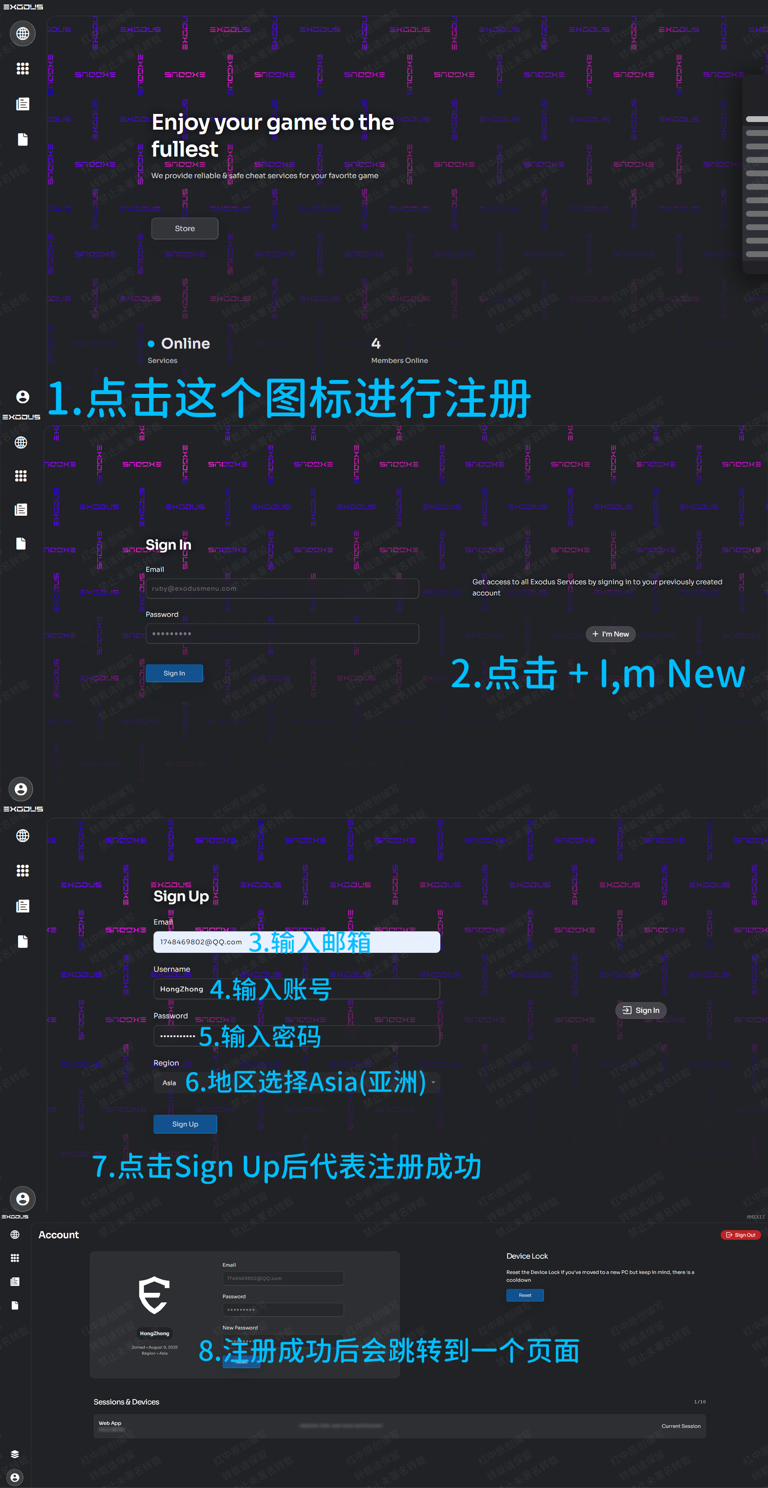
1. After entering the website, click on the character avatar logo in the lower left corner
2. Click I’m new on the right, which means I am a new user.
activation
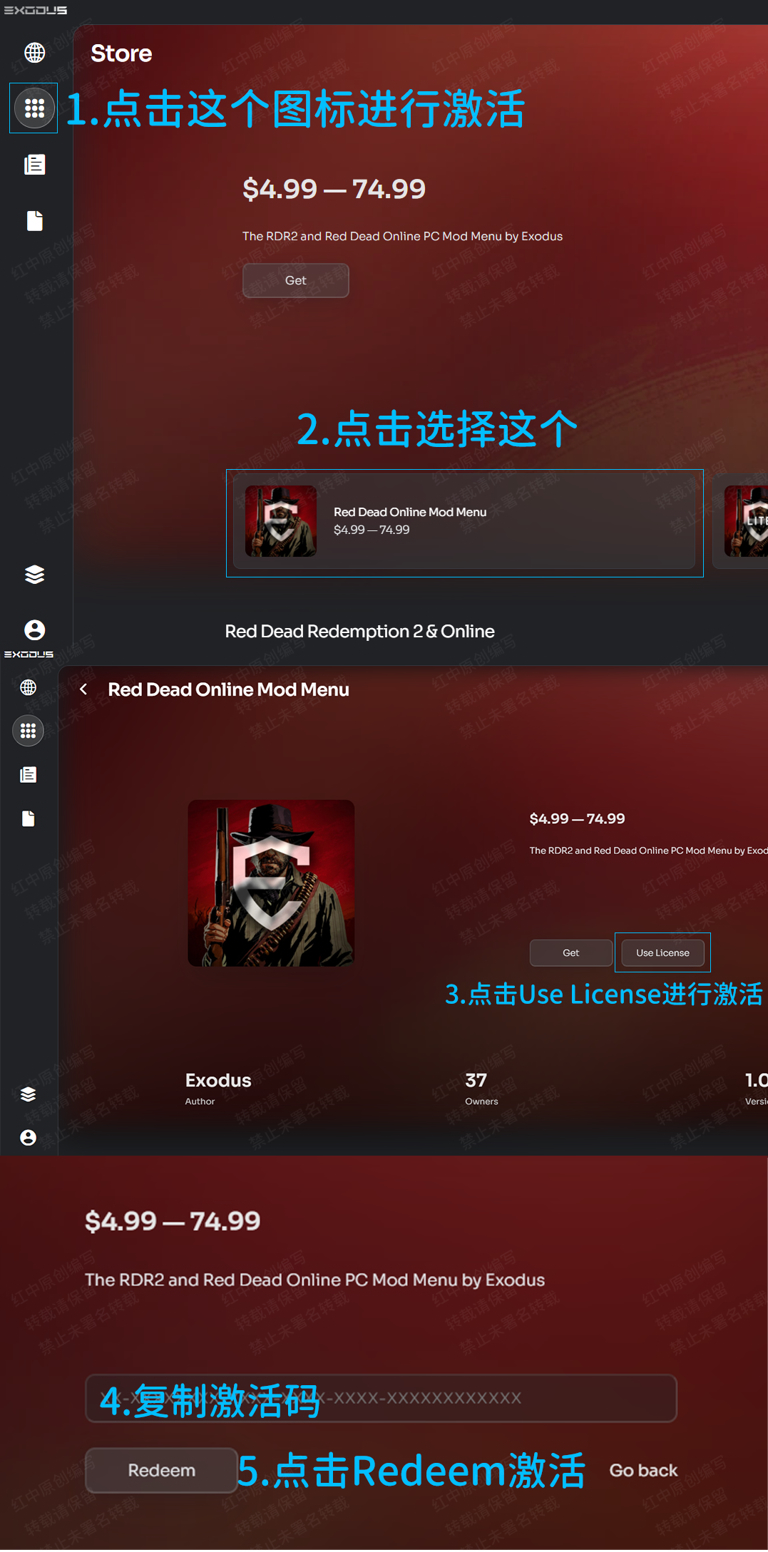
1. After registration is completed, you will return to the original interface, and then follow the steps below.
pleaseKeep a backup copyownactivation codeas well asAccount information, cannot be retrieved after being lost! ! We do not provide any account services!
Subsequent websites will not help back up your activation code information, please do it yourselfsave!
After registration and activation, the account will no longer be associated with us. All account information will be maintained and used by you alone. Please consciously abide by the rules of each menu!
download
Official website download:

everyone'sDLLThey are all separate, you can only download the ones that belong to you from the official websiteDLLdocument.
And every time you update, you need to go to the official website to re-download the DLL file.
injection
Download the DLL from the official website

everyone'sDLLThey are all separate, you can only download the ones that belong to you from the official websiteDLLdocument
And every time you update, you need to go to the official website to re-download the DLL file.
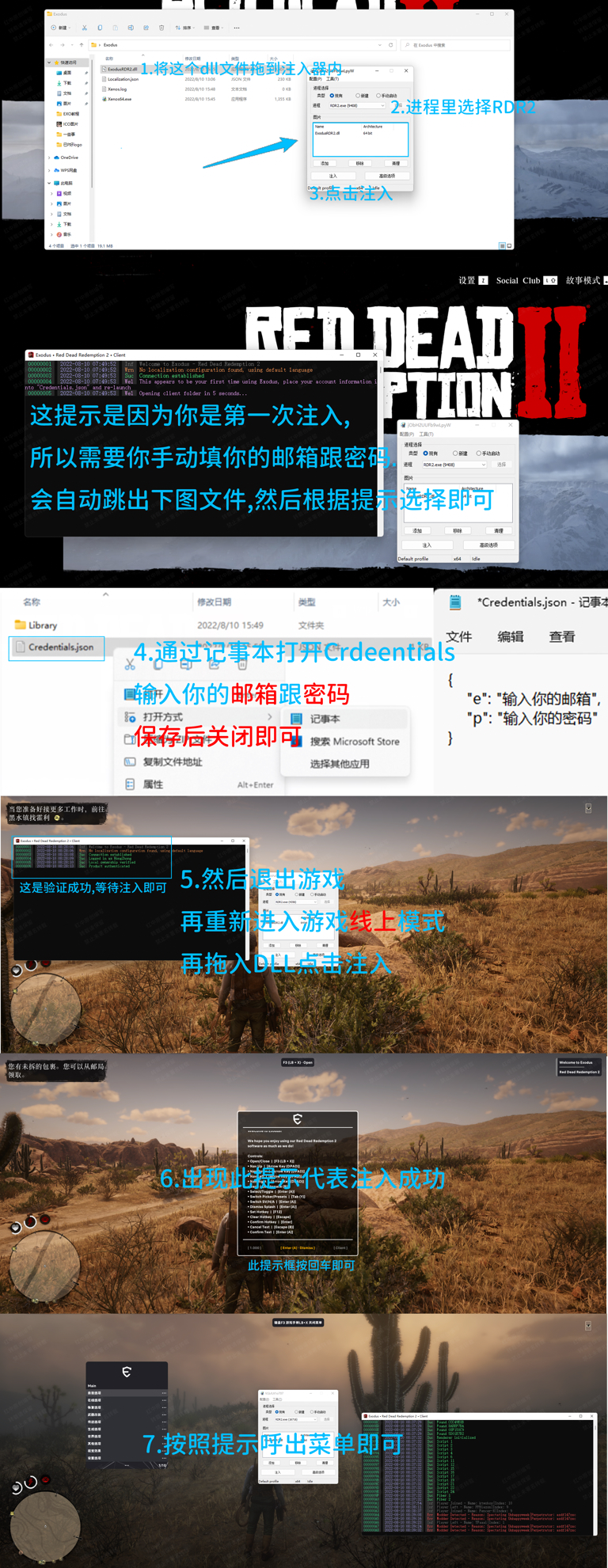
Open the 64-bit Xenos injector (Xenos64.exe) and download theExodus DLLdrag into it
Enter the game
EnterGame main page(chooseOnline mode/story modepage)
After 10 seconds, selectRDR2.exeas a process in the Xenos injector and click Inject
Wait for the console window to open, asking you to enter your email password in "Credentials.json"
Then it will pop up automatically and the file should be opened automatically. If not, please open it yourself.C:\Users\yourusername\AppData\Roaming\Exodus Clientor pressWin + Rand enterAppData\Roaming\Exodus Client.
OpenCredentials.jsonUse Notepad or a text editor of your choice and fill in your email and password
copy
{
"e": "your email here",
"p": "your password here"
}
your email hereIt's a mailbox
your password hereis the password
After saving, drag the DLL again to inject it.
Wait for a prompt to appear on the screen to indicate successful injection.
use
Exodus can only be used online
keyboard
F3Expose/hide menu
Arrow keys↑ ↓Control up and down
Arrow keys← →Control left and right
Enter key/Ent/Sure;Backspace/Back/return
F12Set shortcut keys
handle
RB + XKey to call out
Set Chinese
Netdisk download Chinese
Exodus-Chinese
https://hzmod.lanzoub.com/b02fg9vti
Keystrokes: Win+R to call out and enter%appdata%

Place it in this path C:\Users\Epsilon\AppData\Roaming\Exodus Client\Library\Red Dead Redemption 2\Client
As shown below

Just reopen the game injection