issue-crash-08bf50
Tianruo SVIP enhanced version usage tutorial
Preparations before use (please read carefully when using for the first time)operate)
Since the tool is self-developed software, some anti-virus software may cause false positives or accidental killings. If you encounter such a prompt, please turn off the anti-virus software or add this program to the trust list.
Self-developed software may trigger the protection mechanism of security software. It is normal for virus reports to appear, so please feel free to use it.
necessaryoperate:
1. Click on Operation to turn off antivirus ↓

2. Click ↓ to operate the runtime library

3. Click to prevent flashback during operation↓

4. Click on Operation Off BE↓

Download Tianruo SVIP address:
https://xn--rss248g.cn/


register
Right click and run as administratorTianruo starter


register
.png?time=1779201900&token=469bc83f407b009afeb6f71df6b74344826c5611babfeb94a3c62ee353a72502&role=sharePaid)
.png?time=1779201900&token=f358e63b144e3a544dc6c55807de7735c1e3aa41b57b271f013ab98b7b0e0400&role=sharePaid)
Fill in your account password and email address, then click "Get Verification Code"
Check your email for the verification code and fill it in. If you don't receive the email, check your spam folder

Register and activate
Log in

Open the game injection. After the injection is completed, enter the story mode and then play the single-player battle.
.png?time=1779201900&token=a5df1161de92efd0ff61bf7656aff1728be18a67c237ab100475d6f5994e5023&role=sharePaid)
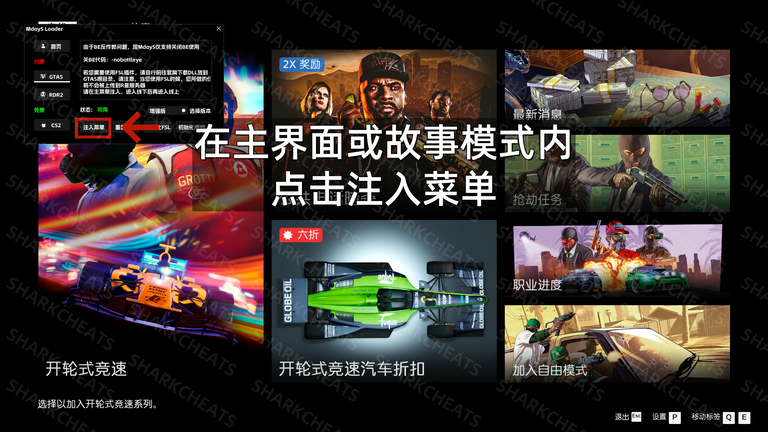
.png?time=1779201900&token=67070697729e2b111bd0565a8425cd2d516f9133cb039cc64ef9647632ca7dda&role=sharePaid)
Operation mode
F5 to call/hide
Mouse operation