xg-FK注崩解决方法-6e788e
FK Note Collapse Solution
Error message 1:
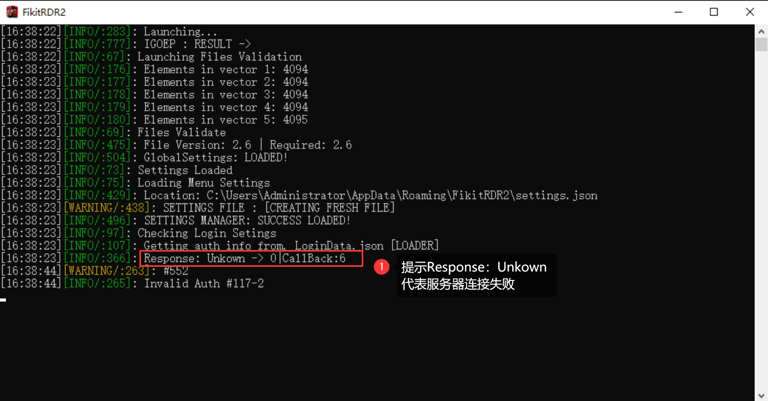
Response: Unkown -> x丨CallBack:x
If the following message appears in the log:: it means the server connection failed.
Solution:
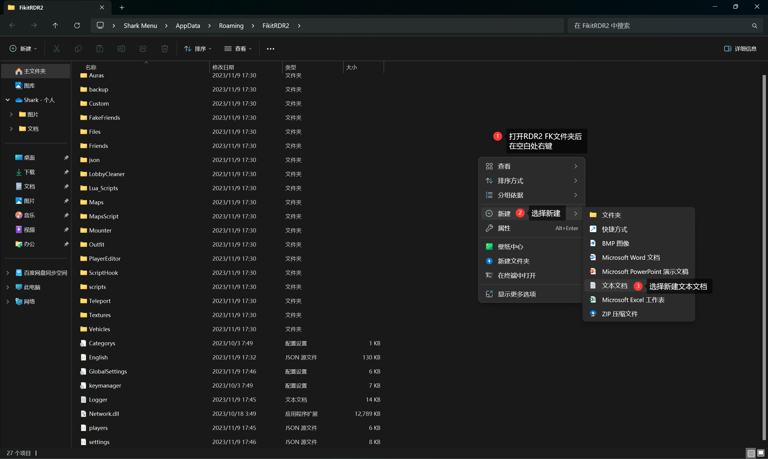
Enter through the systemFiKitRDR2folder
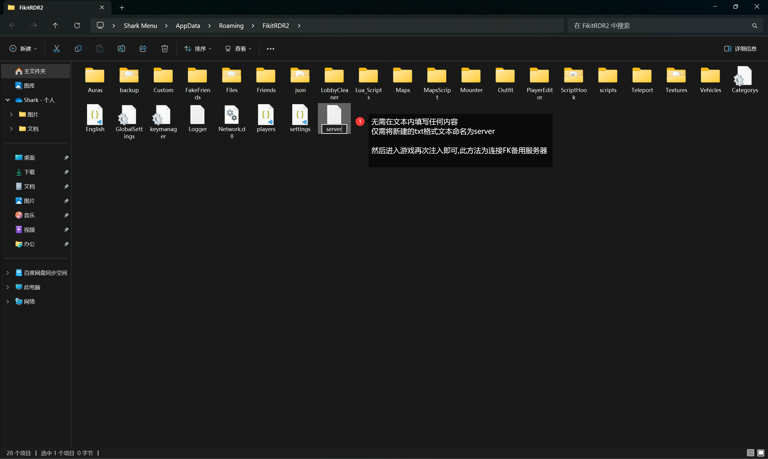
Right click on a blank space in the folder and create a new oneTXTFormatted text document, no need to fill in any content in the document
Just name the new textserver
After saving and naming, enter the game and inject again to connect FK to the backup server.
Error message 2:
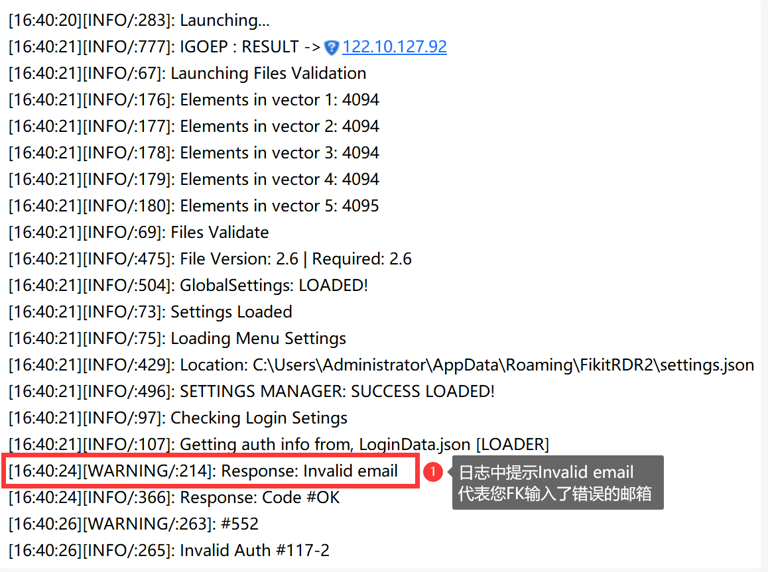
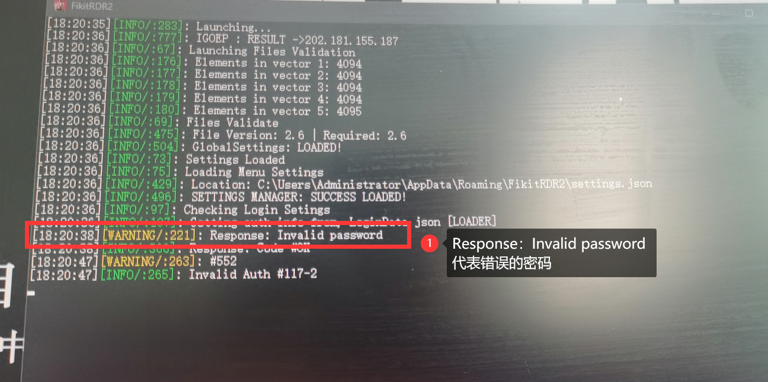
Response:Invalid email [wrong email]Response:Invalid password[wrong password]
If the following message appears in the log: it means the FK email or password is wrong.
[Because the installer is unofficial, you can install it successfully even if you enter 123]
This will cause some users to enter their email and password incorrectly, causing the game to crash.
Solution:
Installer users can uninstall RDR2 FK files with incorrect account passwords through the installer.
Then re-enter and install the correct email password before trying to inject [This problem almost only exists for installer users]
You can operate as shown below
Error message 3:
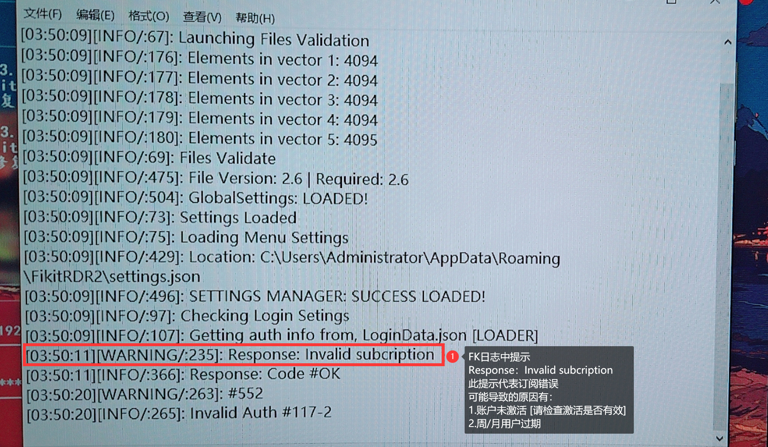
Response:Invalid subcription [Error Subscription] As the name suggests "Subscription=Activate"
If the following message appears in the log: it means the account has not been activated.
1. The account is a weekly/monthly user. Expiration will cause this prompt.
2. Failure to use the activation code to activate the FK account on the official website will result in this prompt
Solution:
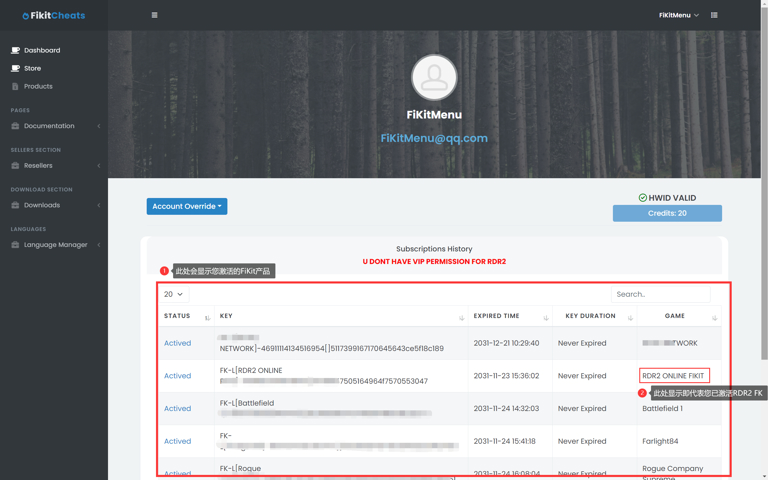
Log in to the FK official website and check whether the subscription is valid
https://fikitcheats.com/
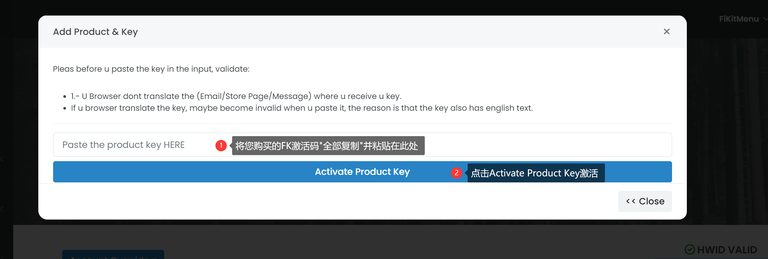
[FK main site, if the main site is blocked and cannot be accessed, access through the backup site]Follow the prompts in the picture below to operate your FK account and you will see your activated products below.
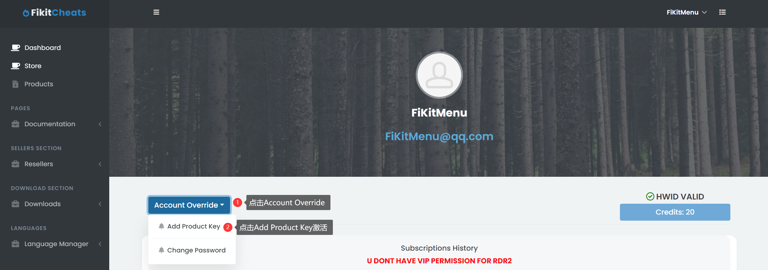
If you do not find any activation content, please follow the steps below to activate your FK account
Error message 4:
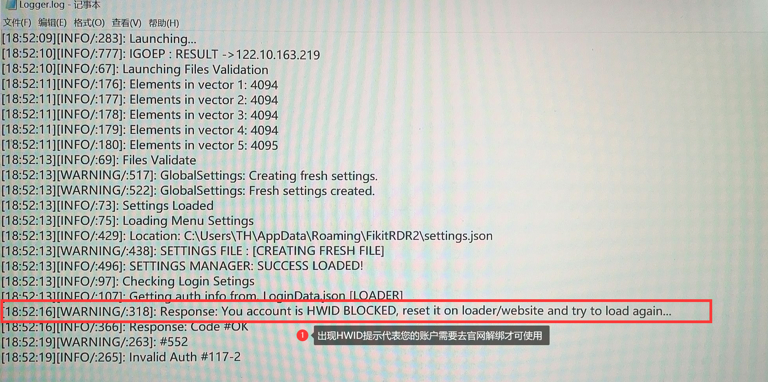
Response:Your acount is HWID BLOCKED [Need to reset HWID to unbind the computer]
If the following message appears in the log: it means that you may have changed the environment or the machine to use FK.
Solution:
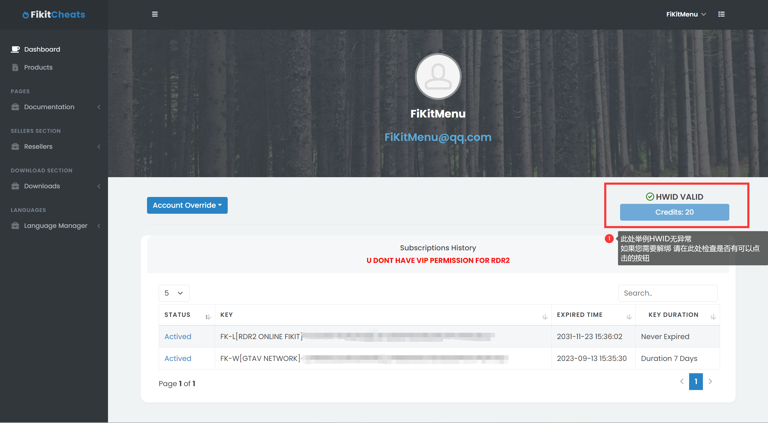
Log in to the FK official website and remove HWID restrictions
https://fikitcheats.com/
[FK main site, if the main site is blocked and cannot be accessed, access through the backup site]Follow the instructions below
Error message 5:
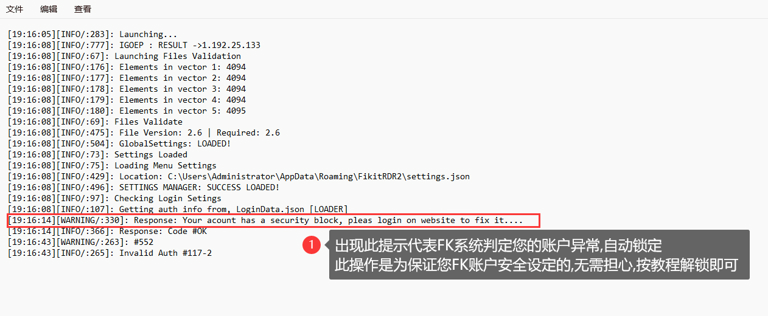
Response:Your acount has a security block,please login on website to fix it.... [Account Locked]
If the following message appears in the log: it means that the FK system determines that your account may be at risk and temporarily locks the account.
Solution:
Log in to FK official website to unlock
https://fikitcheats.com/
[FK main site, if the main site is blocked and cannot be accessed, access through the backup site]Follow the instructions below
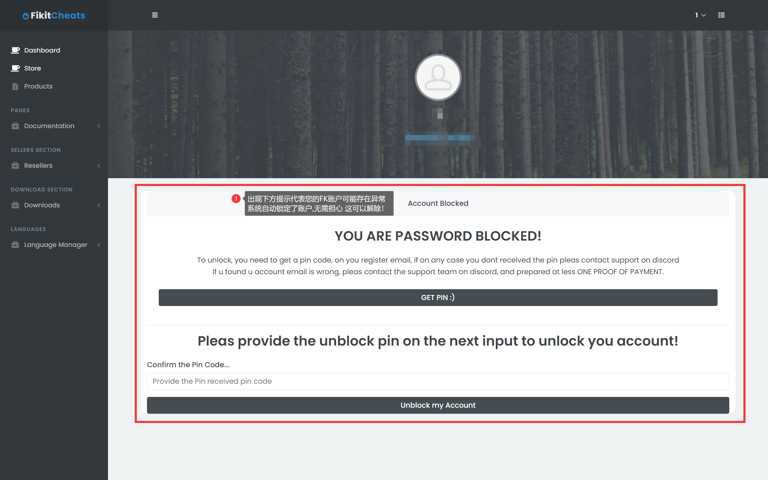
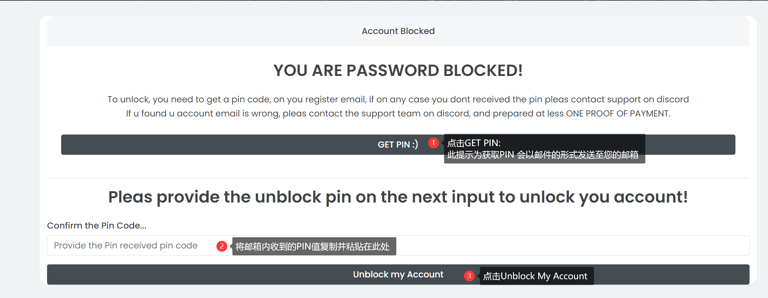

If your account cannot receive the PIN normally
Please check your spam mailbox if you still cannot get the PIN
Please contact the merchant you are selling to provide official feedback to obtain your PIN value
Error message 6:
If the log is as shown below
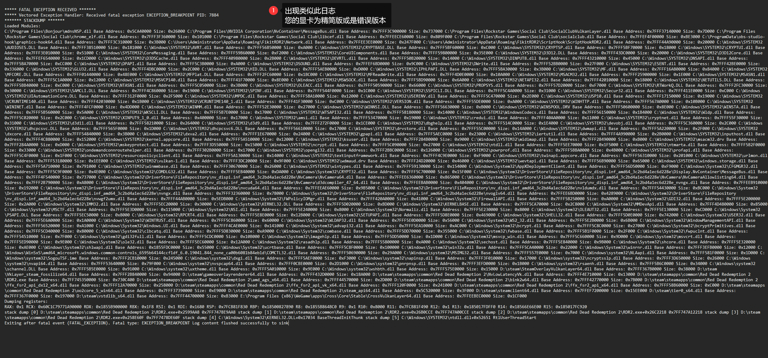
NVIDIA user notes crash
Here is a tutorial for those who are still getting the crash and have an NVIDIA GPU
Check the RDR2 FiKit log. If it is similar to the content below, you can follow this tutorial to solve the problem.
***** FATAL EXCEPTION RECEIVED *******
***** Vectored Exception Handler: Received fatal exception EXCEPTION_BREAKPOINT PID: 7884
******* STACKDUMP *******
Loaded Modules:
C:\Program Files\Bonjour\mdnsNSP.dll Base Address: 0x5CA40000 Size: 0x26000 C:\Program Files\NVIDIA Corporation\NvContainer\MessageBus.dll Base Address: 0x7FFF3C900000 Size: 0x737000 C:\Program Files\Rockstar Games\Social Club\SocialClubVulkanLayer.dll Base Address: 0x7FFF37140000 Size: 0x7D000 C:\Program Files\Rockstar Games\Social Club\chrome_elf.dll Base Address: 0x7FFF3F360000 Size: 0x101000 C:\Program Files\Rockstar Games\Social Club\libcef.dll Base Address: 0x7FFEECE60000 Size: 0x809F000 C:\Program Files\Rockstar Games\Social Club\socialclub.dll Base Address: 0x7FFEF4F00000 Size: 0xBE3000 C:\ProgramData\obs-studio-hook\graphics-hook64.dll Base Address: 0x7FFF3C310000 Size: 0x3B000 C:\Users\Administrator\AppData\Roaming\FikitRDR2\Network.dll Base Address: 0x7FFEE3EE0000 Size: 0x247F000 C:\Users\Administrator\AppData\Roaming\FikitRDR2\ScriptHook\ScriptHookRDR2.dll Base Address: 0x7FFF44A90000 Size: 0x20000 C:\Windows\SYSTEM32\AUDIOSES.DLL Base Address: 0x7FFF38510000 Size: 0x181000 C:\Windows\SYSTEM32\AVRT.dll Base Address: 0x7FFF56B50000 Size: 0xA000 C:\Windows\SYSTEM32\CRYPTBASE.DLL Base Address: 0x7FFF5BF60000 Size: 0xC000 C:\Windows\SYSTEM32\CRYPTSP.dll Base Address: 0x7FFF5BF70000 Size: 0x18000 C:\Windows\SYSTEM32\CRYPTUI.dll Base Address: 0x7FFF3E010000 Size: 0x51000 C:\Windows\SYSTEM32\CoreMessaging.dll Base Address: 0x7FFF59B60000 Size: 0xF2000 C:\Windows\SYSTEM32\CoreUIComponents.dll Base Address: 0x7FFF59800000 Size: 0x35E000 C:\Windows\SYSTEM32\D3D12.DLL Base Address: 0x7FFF43DC0000 Size: 0x20000 C:\Windows\SYSTEM32\D3D12Core.dll Base Address: 0x7FFEF6540000 Size: 0x1CD000 C:\Windows\SYSTEM32\D3DSCache.dll Base Address: 0x7FFF40980000 Size: 0x2B000 C:\Windows\SYSTEM32\DEVRTL.dll Base Address: 0x7FFF50B20000 Size: 0x14000 C:\Windows\SYSTEM32\DINPUT8.dll Base Address: 0x7FFF43210000 Size: 0x45000 C:\Windows\SYSTEM32\DNSAPI.dll Base Address: 0x7FFF5BA70000 Size: 0xCC000 C:\Windows\SYSTEM32\DPAPI.dll Base Address: 0x7FFF5C3B0000 Size: 0xA000 C:\Windows\SYSTEM32\DSOUND.dll Base Address: 0x7FFEF6BD0000 Size: 0x9C000 C:\Windows\SYSTEM32\DWrite.dll Base Address: 0x7FFF52BB0000 Size: 0x27F000 C:\Windows\SYSTEM32\ESENT.dll Base Address: 0x7FFF42BE0000 Size: 0x336000 C:\Windows\SYSTEM32\GLU32.dll Base Address: 0x7FFF4DBC0000 Size: 0x2C000 C:\Windows\SYSTEM32\HID.DLL Base Address: 0x7FFF5AEB0000 Size: 0xD000 C:\Windows\SYSTEM32\IPHLPAPI.DLL Base Address: 0x7FFF5BA30000 Size: 0x3B000 C:\Windows\SYSTEM32\MF.dll Base Address: 0x7FFF16A80000 Size: 0x84000 C:\Windows\SYSTEM32\MFCORE.DLL Base Address: 0x7FFF01440000 Size: 0x48E000 C:\Windows\SYSTEM32\MFPlat.DLL Base Address: 0x7FFF2FC60000 Size: 0x1BC000 C:\Windows\SYSTEM32\MFReadWrite.dll Base Address: 0x7FFF4D0E0000 Size: 0x10A000 C:\Windows\SYSTEM32\MSACM32.dll Base Address: 0x7FFF25900000 Size: 0x1E000 C:\Windows\SYSTEM32\MSASN1.dll Base Address: 0x7FFF5C1A0000 Size: 0x12000 C:\Windows\SYSTEM32\MSVCP140.dll Base Address: 0x7FFF41F70000 Size: 0x8E000 C:\Windows\SYSTEM32\MSWSOCK.dll Base Address: 0x7FFF5BD90000 Size: 0x6A000 C:\Windows\SYSTEM32\NETAPI32.dll Base Address: 0x7FFF42010000 Size: 0x18000 C:\Windows\SYSTEM32\NETUTILS.DLL Base Address: 0x7FFF5BB40000 Size: 0xC000 C:\Windows\SYSTEM32\NTASN1.dll Base Address: 0x7FFF5C050000 Size: 0x3B000 C:\Windows\SYSTEM32\OLEACC.dll Base Address: 0x7FFF50590000 Size: 0x66000 C:\Windows\SYSTEM32\PROPSYS.dll Base Address: 0x7FFF57D20000 Size: 0xF7000 C:\Windows\SYSTEM32\RTWorkQ.DLL Base Address: 0x7FFF2FC30000 Size: 0x30000 C:\Windows\SYSTEM32\SAMCLI.DLL Base Address: 0x7FFF4C860000 Size: 0x19000 C:\Windows\SYSTEM32\SPINF.dll Base Address: 0x7FFF544F0000 Size: 0x1C000 C:\Windows\SYSTEM32\SSPICLI.DLL Base Address: 0x7FFF5C4A0000 Size: 0x31000 C:\Windows\SYSTEM32\Secur32.dll Base Address: 0x7FFF411E0000 Size: 0xC000 C:\Windows\SYSTEM32\UIAutomationCore.DLL Base Address: 0x7FFF312F0000 Size: 0x2F5000 C:\Windows\SYSTEM32\UMPDC.dll Base Address: 0x7FFF5BA10000 Size: 0x12000 C:\Windows\SYSTEM32\USERENV.dll Base Address: 0x7FFF5C470000 Size: 0x2E000 C:\Windows\SYSTEM32\USP10.dll Base Address: 0x7FFF17150000 Size: 0x19000 C:\Windows\SYSTEM32\VCRUNTIME140.dll Base Address: 0x7FFF42030000 Size: 0x1B000 C:\Windows\SYSTEM32\VCRUNTIME140_1.dll Base Address: 0x7FFF41F30000 Size: 0xC000 C:\Windows\SYSTEM32\VERSION.dll Base Address: 0x7FFF55DE0000 Size: 0xA000 C:\Windows\SYSTEM32\WINHTTP.dll Base Address: 0x7FFF567A0000 Size: 0x10B000 C:\Windows\SYSTEM32\WININET.dll Base Address: 0x7FFF4FCF0000 Size: 0x4DD000 C:\Windows\SYSTEM32\WINMM.dll Base Address: 0x7FFF52E30000 Size: 0x27000 C:\Windows\SYSTEM32\WINNSI.DLL Base Address: 0x7FFF56630000 Size: 0xB000 C:\Windows\SYSTEM32\WINSPOOL.DRV Base Address: 0x7FFF50600000 Size: 0x8E000 C:\Windows\SYSTEM32\WINSTA.dll Base Address: 0x7FFF5B560000 Size: 0x5A000 C:\Windows\SYSTEM32\WKSCLI.DLL Base Address: 0x7FFF5B7E0000 Size: 0x17000 C:\Windows\SYSTEM32\WTSAPI32.dll Base Address: 0x7FFF58180000 Size: 0x14000 C:\Windows\SYSTEM32\WindowsCodecs.dll Base Address: 0x7FFF56150000 Size: 0x1B4000 C:\Windows\SYSTEM32\Wldp.dll Base Address: 0x7FFF5C020000 Size: 0x2C000 C:\Windows\SYSTEM32\XINPUT9_1_0.dll Base Address: 0x400000 Size: 0x17000 C:\Windows\SYSTEM32\amsi.dll Base Address: 0x7FFF53470000 Size: 0x19000 C:\Windows\SYSTEM32\credui.dll Base Address: 0x7FFF40AA0000 Size: 0x11000 C:\Windows\SYSTEM32\cryptnet.dll Base Address: 0x7FFF55F30000 Size: 0x31000 C:\Windows\SYSTEM32\d3d11.dll Base Address: 0x7FFF58210000 Size: 0x264000 C:\Windows\SYSTEM32\d3d9.dll Base Address: 0x7FFF272F0000 Size: 0x1CE000 C:\Windows\SYSTEM32\dbghelp.dll Base Address: 0x7FFF514C0000 Size: 0x1E4000 C:\Windows\SYSTEM32\devobj.dll Base Address: 0x7FFF5C360000 Size: 0x2C000 C:\Windows\SYSTEM32\dhcpcsvc.DLL Base Address: 0x7FFF565F0000 Size: 0x1D000 C:\Windows\SYSTEM32\dhcpcsvc6.DLL Base Address: 0x7FFF56610000 Size: 0x17000 C:\Windows\SYSTEM32\drvstore.dll Base Address: 0x7FFF55C00000 Size: 0x14A000 C:\Windows\SYSTEM32\dwmapi.dll Base Address: 0x7FFF5A220000 Size: 0x2F000 C:\Windows\SYSTEM32\dxcore.dll Base Address: 0x7FFF54840000 Size: 0x3B000 C:\Windows\SYSTEM32\dxva2.dll Base Address: 0x7FFF1E670000 Size: 0x24000 C:\Windows\SYSTEM32\gpapi.dll Base Address: 0x7FFF5AEC0000 Size: 0x23000 C:\Windows\SYSTEM32\iertutil.dll Base Address: 0x7FFF4A990000 Size: 0x2B0000 C:\Windows\SYSTEM32\inputhost.dll Base Address: 0x7FFF4C880000 Size: 0x152000 C:\Windows\SYSTEM32\kernel.appcore.dll Base Address: 0x7FFF5A510000 Size: 0x12000 C:\Windows\SYSTEM32\ksuser.dll Base Address: 0x7FFF284B0000 Size: 0x9000 C:\Windows\SYSTEM32\midimap.dll Base Address: 0x7FFF28490000 Size: 0xB000 C:\Windows\SYSTEM32\msacm32.drv Base Address: 0x7FFF284A0000 Size: 0xD000 C:\Windows\SYSTEM32\mskeyprotect.dll Base Address: 0x7FFF3D550000 Size: 0x15000 C:\Windows\SYSTEM32\ncrypt.dll Base Address: 0x7FFF5C090000 Size: 0x27000 C:\Windows\SYSTEM32\ntdll.dll Base Address: 0x7FFF5EE70000 Size: 0x1F5000 C:\Windows\SYSTEM32\ntmarta.dll Base Address: 0x7FFF5B2F0000 Size: 0x33000 C:\Windows\SYSTEM32\ondemandconnroutehelper.dll Base Address: 0x7FFF302B0000 Size: 0x17000 C:\Windows\SYSTEM32\opengl32.dll Base Address: 0x7FFF2BBC0000 Size: 0x126000 C:\Windows\SYSTEM32\powrprof.dll Base Address: 0x7FFF5BBA0000 Size: 0x4B000 C:\Windows\SYSTEM32\profapi.dll Base Address: 0x7FFF5C4F0000 Size: 0x1F000 C:\Windows\SYSTEM32\resourcepolicyclient.dll Base Address: 0x7FFF5A130000 Size: 0x14000 C:\Windows\SYSTEM32\textinputframework.dll Base Address: 0x7FFF4C9E0000 Size: 0xF9000 C:\Windows\SYSTEM32\twinapi.appcore.dll Base Address: 0x7FFF56310000 Size: 0x201000 C:\Windows\SYSTEM32\urlmon.dll Base Address: 0x7FFF53180000 Size: 0x1EE000 C:\Windows\SYSTEM32\vulkan-1.dll Base Address: 0x7FFF3DC20000 Size: 0x9F000 C:\Windows\SYSTEM32\wdmaud.drv Base Address: 0x7FFF24D20000 Size: 0x46000 C:\Windows\SYSTEM32\wevtapi.dll Base Address: 0x7FFF56B90000 Size: 0x65000 C:\Windows\SYSTEM32\windows.storage.dll Base Address: 0x7FFF5A710000 Size: 0x791000 C:\Windows\SYSTEM32\winmmbase.dll Base Address: 0x7FFF30670000 Size: 0x26000 C:\Windows\SYSTEM32\wintypes.dll Base Address: 0x7FFF59130000 Size: 0x154000 C:\Windows\System32\AppXDeploymentClient.dll Base Address: 0x7FFF56D50000 Size: 0xF9000 C:\Windows\System32\CFGMGR32.dll Base Address: 0x7FFF5C9F0000 Size: 0x4E000 C:\Windows\System32\COMDLG32.dll Base Address: 0x7FFF5EB40000 Size: 0xDA000 C:\Windows\System32\CRYPT32.dll Base Address: 0x7FFF5C700000 Size: 0x15F000 C:\Windows\System32\DriverStore\FileRepository\nv_dispi.inf_amd64_3c2bd4a1ec6d228e\Display.NvContainer\MessageBus.dll Base Address: 0x7FFF4F540000 Size: 0x737000 C:\Windows\System32\DriverStore\FileRepository\nv_dispi.inf_amd64_3c2bd4a1ec6d228e\NvCamera\NvCamera64.dll Base Address: 0x7FFEE6360000 Size: 0x865000 C:\Windows\System32\DriverStore\FileRepository\nv_dispi.inf_amd64_3c2bd4a1ec6d228e\NvCamera\NvCameraAllowlisting64.dll Base Address: 0x7FFF2B790000 Size: 0xA8000 C:\Windows\System32\DriverStore\FileRepository\nv_dispi.inf_amd64_3c2bd4a1ec6d228e\NvCamera\d3dcompiler_47_64.dll Base Address: 0x7FFEEBAB0000 Size: 0x404000 C:\Windows\System32\DriverStore\FileRepository\nv_dispi.inf_amd64_3c2bd4a1ec6d228e_nvngx.dll Base Address: 0x7FFEEB910000 Size: 0x192000 C:\Windows\System32\DriverStore\FileRepository\nv_dispi.inf_amd64_3c2bd4a1ec6d228e\nvcuda64.dll Base Address: 0x7FFEEAE60000 Size: 0x9B5000 C:\Windows\System32\DriverStore\FileRepository\nv_dispi.inf_amd64_3c2bd4a1ec6d228e\nvldumdx.dll Base Address: 0x7FFF54430000 Size: 0xBC000 C:\Windows\System32\DriverStore\FileRepository\nv_dispi.inf_amd64_3c2bd4a1ec6d228e\nvngx.dll Base Address: 0x7FFF32360000 Size: 0x78000 C:\Windows\System32\DriverStore\FileRepository\nv_dispi.inf_amd64_3c2bd4a1ec6d228e\nvoglv64.dll Base Address: 0x7FFEE6BD0000 Size: 0x4289000 C:\Windows\System32\DriverStore\FileRepository\nv_dispi.inf_amd64_3c2bd4a1ec6d228e\nvwgf2umx.dll Base Address: 0x7FFF44AB0000 Size: 0x5EDB000 C:\Windows\System32\FWPolicyIOMgr.dll Base Address: 0x7FFF420A0000 Size: 0x41000 C:\Windows\System32\FirewallAPI.dll Base Address: 0x7FFF5B250000 Size: 0xA0000 C:\Windows\System32\GDI32.dll Base Address: 0x7FFF5E200000 Size: 0x2A000 C:\Windows\System32\IMM32.dll Base Address: 0x7FFF5EC20000 Size: 0x30000 C:\Windows\System32\KERNEL32.DLL Base Address: 0x7FFF5D020000 Size: 0xBD000 C:\Windows\System32\KERNELBASE.dll Base Address: 0x7FFF5CA70000 Size: 0x2C8000 C:\Windows\System32\MMDevApi.dll Base Address: 0x7FFF4D480000 Size: 0x85000 C:\Windows\System32\MSCTF.dll Base Address: 0x7FFF5E3D0000 Size: 0x115000 C:\Windows\System32\NSI.dll Base Address: 0x7FFF5E240000 Size: 0x8000 C:\Windows\System32\Normaliz.dll Base Address: 0x7FFF5E230000 Size: 0x8000 C:\Windows\System32\OLEAUT32.dll Base Address: 0x7FFF5E130000 Size: 0xCD000 C:\Windows\System32\PSAPI.DLL Base Address: 0x7FFF5EC50000 Size: 0x8000 C:\Windows\System32\RPCRT4.dll Base Address: 0x7FFF5E8E0000 Size: 0x12B000 C:\Windows\System32\SETUPAPI.dll Base Address: 0x7FFF5D8E0000 Size: 0x469000 C:\Windows\System32\SHELL32.dll Base Address: 0x7FFF5D0E0000 Size: 0x742000 C:\Windows\System32\USER32.dll Base Address: 0x7FFF5E6A0000 Size: 0x1A0000 C:\Windows\System32\WINTRUST.dll Base Address: 0x7FFF5C860000 Size: 0x60000 C:\Windows\System32\WLDAP32.dll Base Address: 0x7FFF5E0D0000 Size: 0x56000 C:\Windows\System32\WS2_32.dll Base Address: 0x7FFF5E2B0000 Size: 0x6B000 C:\Windows\System32\WindowManagementAPI.dll Base Address: 0x7FFF56520000 Size: 0xA1000 C:\Windows\System32\Windows.UI.dll Base Address: 0x7FFF4CAE0000 Size: 0x141000 C:\Windows\System32\advapi32.dll Base Address: 0x7FFF5EA10000 Size: 0xAC000 C:\Windows\System32\bcrypt.dll Base Address: 0x7FFF5C8C0000 Size: 0x27000 C:\Windows\System32\bcryptPrimitives.dll Base Address: 0x7FFF5CD40000 Size: 0x80000 C:\Windows\System32\clbcatq.dll Base Address: 0x7FFF5D830000 Size: 0xA9000 C:\Windows\System32\combase.dll Base Address: 0x7FFF5DD70000 Size: 0x355000 C:\Windows\System32\fwbase.dll Base Address: 0x7FFF5B1F0000 Size: 0x2F000 C:\Windows\System32\fwpuclnt.dll Base Address: 0x7FFF54510000 Size: 0x7F000 C:\Windows\System32\gdi32full.dll Base Address: 0x7FFF5CDC0000 Size: 0x10B000 C:\Windows\System32\imagehlp.dll Base Address: 0x7FFF5DD50000 Size: 0x1D000 C:\Windows\System32\msvcp_win.dll Base Address: 0x7FFF5C660000 Size: 0x9D000 C:\Windows\System32\msvcrt.dll Base Address: 0x7FFF5ED90000 Size: 0x9E000 C:\Windows\System32\ole32.dll Base Address: 0x7FFF5EC60000 Size: 0x12A000 C:\Windows\System32\rasadhlp.dll Base Address: 0x7FFF55800000 Size: 0xA000 C:\Windows\System32\sechost.dll Base Address: 0x7FFF5E840000 Size: 0x9B000 C:\Windows\System32\shcore.dll Base Address: 0x7FFF5E320000 Size: 0xAE000 C:\Windows\System32\shlwapi.dll Base Address: 0x1855FDC0000 Size: 0x55000 C:\Windows\System32\ucrtbase.dll Base Address: 0x7FFF5C8F0000 Size: 0x100000 C:\Windows\System32\win32u.dll Base Address: 0x7FFF5CA40000 Size: 0x22000 C:\Windows\System32\winrnr.dll Base Address: 0x7FFF3EFB0000 Size: 0x12000 C:\Windows\WinSxS\amd64_microsoft.windows.common-controls_6595b64144ccf1df_6.0.19041.844_none_ca00b6081b84eb1d\COMCTL32.dll Base Address: 0x7FFF50690000 Size: 0x29A000 C:\Windows\system32\MSIMG32.dll Base Address: 0x7FFF557E0000 Size: 0x7000 C:\Windows\system32\NLAapi.dll Base Address: 0x7FFF581F0000 Size: 0x1D000 C:\Windows\system32\SogouTSF.ime Base Address: 0x7FFF2CB10000 Size: 0x245000 C:\Windows\system32\dxgi.dll Base Address: 0x7FFF5AEF0000 Size: 0xF3000 C:\Windows\system32\napinsp.dll Base Address: 0x7FFF3F010000 Size: 0x17000 C:\Windows\system32\ncryptsslp.dll Base Address: 0x7FFF3D650000 Size: 0x26000 C:\Windows\system32\nvapi64.dll Base Address: 0x7FFF53640000 Size: 0x79F000 C:\Windows\system32\nvspcap64.dll Base Address: 0x7FFF0CBE0000 Size: 0x2D1000 C:\Windows\system32\pnrpnsp.dll Base Address: 0x7FFF3EFD0000 Size: 0x1B000 C:\Windows\system32\rsaenh.dll Base Address: 0x7FFF5B6C0000 Size: 0x34000 C:\Windows\system32\schannel.DLL Base Address: 0x7FFF5B5E0000 Size: 0x91000 C:\Windows\system32\uxtheme.dll Base Address: 0x7FFF5A010000 Size: 0x9E000 C:\Windows\system32\wshbth.dll Base Address: 0x7FFF575E0000 Size: 0x15000 D:\steam\SteamOverlayVulkanLayer64.dll Base Address: 0x7FFF367B0000 Size: 0x38000 D:\steam\VkLayer_steam_fossilize64.dll Base Address: 0x7FFF2B840000 Size: 0x94000 D:\steam\gameoverlayrenderer64.dll Base Address: 0x7FFF432D0000 Size: 0x18A000 D:\steam\steamapps\common\Red Dead Redemption 2\NvLowLatencyVk.dll Base Address: 0x7FFF4E710000 Size: 0x13000 D:\steam\steamapps\common\Red Dead Redemption 2\RDR2.exe Base Address: 0x7FF745350000 Size: 0x730C400 D:\steam\steamapps\common\Red Dead Redemption 2\amd_ags_x64.dll Base Address: 0x7FFF44570000 Size: 0x2D000 D:\steam\steamapps\common\Red Dead Redemption 2\bink2w64.dll Base Address: 0x7FFF42770000 Size: 0x7B000 D:\steam\steamapps\common\Red Dead Redemption 2\ffx_fsr2_api_dx12_x64.dll Base Address: 0x7FFF12A70000 Size: 0x258000 D:\steam\steamapps\common\Red Dead Redemption 2\ffx_fsr2_api_vk_x64.dll Base Address: 0x7FFF120F0000 Size: 0x241000 D:\steam\steamapps\common\Red Dead Redemption 2\ffx_fsr2_api_x64.dll Base Address: 0x7FFF58B60000 Size: 0xC000 D:\steam\steamapps\common\Red Dead Redemption 2\oo2core_5_win64.dll Base Address: 0x7FFF37390000 Size: 0xE9000 D:\steam\steamapps\common\Red Dead Redemption 2\steam_api64.dll Base Address: 0x5C520000 Size: 0x3F000 D:\steam\steamclient64.dll Base Address: 0x7FFEF7200000 Size: 0x15EE000 D:\steam\tier0_s64.dll Base Address: 0x7FFF367F0000 Size: 0x197000 D:\steam\vstdlib_s64.dll Base Address: 0x7FFF44700000 Size: 0xB3000 E:\Program Files (x86)\WeGame\apps\Cross\Core\Stable\CrossVulkanLayer64.dll Base Address: 0x7FFEEBEC0000 Size: 0x1CF000
Dumping registers:
RAX: 0x1 RCX: 0x60C1C79771A90000 RDX: 0x1855B900000 RBX: 0x1F8 RSI: 0x1 RDI: 0x1680 RSP: 0x7FCB81F830 RBP: 0x18500827890 R8: 0x1855B864BC0 R9: 0x1 R10: 0x8000 R11: 0x7FCB81F490 R12: 0x1 R13: 0x185017FDFF0 R14: 0x18566E66E00 R15: 0x185017FC920
stack dump [0] D:\steam\steamapps\common\Red Dead Redemption 2\RDR2.exe+0x2599AA8 0x7FF7478E9AA8 stack dump [1] D:\steam\steamapps\common\Red Dead Redemption 2\RDR2.exe+0x26B0CCE 0x7FF747A00CCE stack dump [2] D:\steam\steamapps\common\Red Dead Redemption 2\RDR2.exe+0x26C2218 0x7FF747A12218 stack dump [3] D:\steam\steamapps\common\Red Dead Redemption 2\RDR2.exe+0x258E60F 0x7FF7478DE60F stack dump [4] C:\Windows\System32\KERNEL32.DLL+0x17034 BaseThreadInitThunk stack dump [5] C:\Windows\SYSTEM32\ntdll.dll+0x52651 RtlUserThreadStart
Exiting after fatal event (FATAL_EXCEPTION). Fatal type: EXCEPTION_BREAKPOINT Log content flushed successfully to sink
Click to download the adapter driver
Download NVIDIA driver

Click Download to download

Click Download to download
Right-click and run the NVIDIA driver installer as administrator

Right click and run as administrator
Continue to operate as shown

The default directory is sufficient. Click OK.

waiting to load


Check Customize and next step

Check all options and next step
After the installation is complete, restart your computer and try to inject again.
If the above error does not occur, follow the steps
first step:
WIN+R Enter CMD and press Enter
Check if the path is Chinese
If the position of "123" in the picture above is Chinese
Please try to modify the "My Documents" path or modify the "User Name" to English
In-game settings:
RDR2
Game settings-borderless windowing
Pause game when turning off focus
DX version adjusted to DX12

Computer settings:
Uninstall all anti-virus software from your computer (Computer Manager 360 Master Luetc)
Turn off the built-in anti-virus in the computer. Click to view the tutorial on turning off the built-in anti-virus in WIN10.
Repair using DX Repair Tool
Close and exit all overlay software, such as: GAME++, MSI Afterburner, NVIDIA GeForce, etc.
Close and exit various debuggers on your computer, for example: CE
accelerator
Free accelerators are prohibited
Try accelerators such as Thor/Mint/Fresh Cow and the so-called ** accelerator box on your own. If it doesn't work, use the following accelerators.
Try changing the accelerator, changing the accelerator mode, changing the accelerator node until it can be injected and used.
UU accelerationMode 3
Little black box acceleratorPlease speed up Red Dead Redemption 2, not Red Dead Redemption ol. Mode 1
Xunyou AcceleratorMode 3/5
Qiyou AcceleratorMode 1/4
Check if there are any other menu auxiliary residues in the game folder. If so, please delete them.
If the above does not resolve the issue, try reinstalling the system.
The after-sales team downloads "system image" and "installs system image program"
Recommended system:Win10 1903+ Professional Edition